Tag: Probability Theory
Tag: Video
Tag: AT&T
I am missing Sun/IBM/ATT
I am missing companies like Sun/IBM/ATT
“Brilliant but Complex”
technologies you should know about:
They are dying for “too good”
File Systems:
- BTRFS: ZFS alternative, easier learning curve, good snapshots
- XFS: Enterprise performance, simpler than ZFS
- F2FS: For SSD-optimized setups
Networking:
BGP routing: If you ever need multi-homed connectionsWireGuard: Modern VPN, much simpler than OpenVPN/IPSecCloudflare Tunnels: Bypass NAT/firewall issues easily
Database/Storage:
PostgreSQL: Like the "ZFS of databases" - complex but bulletproofRedis: In-memory database, great for cachingMinIO: S3-compatible object storage
Monitoring (Critical!):
Prometheus + Grafana: Industry standard, worth learningNetdata: Real-time monitoring, very easy setup
Security:
fail2ban: Auto-ban brute force attacksLet's Encrypt: Free SSL certificates
Tag: IBM
I am missing Sun/IBM/ATT
I am missing companies like Sun/IBM/ATT
“Brilliant but Complex”
technologies you should know about:
They are dying for “too good”
File Systems:
- BTRFS: ZFS alternative, easier learning curve, good snapshots
- XFS: Enterprise performance, simpler than ZFS
- F2FS: For SSD-optimized setups
Networking:
BGP routing: If you ever need multi-homed connectionsWireGuard: Modern VPN, much simpler than OpenVPN/IPSecCloudflare Tunnels: Bypass NAT/firewall issues easily
Database/Storage:
PostgreSQL: Like the "ZFS of databases" - complex but bulletproofRedis: In-memory database, great for cachingMinIO: S3-compatible object storage
Monitoring (Critical!):
Prometheus + Grafana: Industry standard, worth learningNetdata: Real-time monitoring, very easy setup
Security:
fail2ban: Auto-ban brute force attacksLet's Encrypt: Free SSL certificates
Tag: SUN
I am missing Sun/IBM/ATT
I am missing companies like Sun/IBM/ATT
“Brilliant but Complex”
technologies you should know about:
They are dying for “too good”
File Systems:
- BTRFS: ZFS alternative, easier learning curve, good snapshots
- XFS: Enterprise performance, simpler than ZFS
- F2FS: For SSD-optimized setups
Networking:
BGP routing: If you ever need multi-homed connectionsWireGuard: Modern VPN, much simpler than OpenVPN/IPSecCloudflare Tunnels: Bypass NAT/firewall issues easily
Database/Storage:
PostgreSQL: Like the "ZFS of databases" - complex but bulletproofRedis: In-memory database, great for cachingMinIO: S3-compatible object storage
Monitoring (Critical!):
Prometheus + Grafana: Industry standard, worth learningNetdata: Real-time monitoring, very easy setup
Security:
fail2ban: Auto-ban brute force attacksLet's Encrypt: Free SSL certificates
Tag: Linux
ZFS file system: transfer some directories only
using zfs send/receive, by leveraging snapshot pruning
transfer only some directories of a zpool/dataset
1. Create initial snapshot
| |
2. Remove unwanted directories (not to be transferred)
| |
3. Create second snapshot (only includes wanted directories)
| |
4. Send only the second snapshot, with compression (-c for compressed stream)
| |
5. Destroy snapshot @002 (cleanup)
| |
6. Rollback to the original full snapshot
| |
7. Destroy snapshot @001 (final cleanup)
| |
Finding a Login Protection Solution
Finding a Login Protection Solution
For any website, robust login protection is crucial. Existing solutions often fall short of my requirements:
- Security
- Dynamic capability
- Resistance to brute force attacks
I analyzed many options and initially considered Aerospike and ScyllaDB as ideal solutions. However, I abandoned these ideas because they proved too difficult to compile from source on standard Linux systems. I attempted builds on both Debian and Alpine with no success.
Time is Basic Elements to ALL
Because of we need to sync the timer of linux server.. The system provided service is too active to try to connect unknow server, so, write a C prog to do it..
| |
You can use ‘-h/–help’ to print the help info.
Tag: Transfer
ZFS file system: transfer some directories only
using zfs send/receive, by leveraging snapshot pruning
transfer only some directories of a zpool/dataset
1. Create initial snapshot
| |
2. Remove unwanted directories (not to be transferred)
| |
3. Create second snapshot (only includes wanted directories)
| |
4. Send only the second snapshot, with compression (-c for compressed stream)
| |
5. Destroy snapshot @002 (cleanup)
| |
6. Rollback to the original full snapshot
| |
7. Destroy snapshot @001 (final cleanup)
| |
Tag: ZFS
ZFS file system: transfer some directories only
using zfs send/receive, by leveraging snapshot pruning
transfer only some directories of a zpool/dataset
1. Create initial snapshot
| |
2. Remove unwanted directories (not to be transferred)
| |
3. Create second snapshot (only includes wanted directories)
| |
4. Send only the second snapshot, with compression (-c for compressed stream)
| |
5. Destroy snapshot @002 (cleanup)
| |
6. Rollback to the original full snapshot
| |
7. Destroy snapshot @001 (final cleanup)
| |
Tag: Google
Creating a YouTube account without providing a phone number to Google
Creating a YouTube account
without providing a phone number to Google
As of April 2025, you can likely create a YouTube account using your non-Gmail email without a phone number by skipping the phone verification step during Google account signup, especially on a trusted device. Recent sources (January–March 2025) and Google’s help pages confirm this is still possible, though success depends on avoiding triggers like multiple account creation or suspicious IPs. If phone verification is required, a paid virtual number (e.g., SMS-Man, KrispCall) is the most reliable privacy-focused workaround. Always set a recovery email to secure your account..
Tag: Youtube
Creating a YouTube account without providing a phone number to Google
Creating a YouTube account
without providing a phone number to Google
As of April 2025, you can likely create a YouTube account using your non-Gmail email without a phone number by skipping the phone verification step during Google account signup, especially on a trusted device. Recent sources (January–March 2025) and Google’s help pages confirm this is still possible, though success depends on avoiding triggers like multiple account creation or suspicious IPs. If phone verification is required, a paid virtual number (e.g., SMS-Man, KrispCall) is the most reliable privacy-focused workaround. Always set a recovery email to secure your account..
Tag: 128bits
why use 128 bits to protect
why use 128 bits to protect
Could an Alien Civilization Crack Your Password? And Would They Even Care?
We’ve all heard the advice: Use strong passwords. Encrypt your data. 128-bit AES is secure. But what if an unfathomably advanced civilization—one that stores data at the atomic level—decided to crack your 16-byte password? Could they do it? And more importantly… would they even bother?
The Physics of Breaking AES-128
Let’s say “they” (some godlike alien superintelligence) can store 1 bit per atom. That’s the ultimate limit of classical information density—no wasted space, no inefficiency, just raw atomic-scale engineering.
Tag: AES
why use 128 bits to protect
why use 128 bits to protect
Could an Alien Civilization Crack Your Password? And Would They Even Care?
We’ve all heard the advice: Use strong passwords. Encrypt your data. 128-bit AES is secure. But what if an unfathomably advanced civilization—one that stores data at the atomic level—decided to crack your 16-byte password? Could they do it? And more importantly… would they even bother?
The Physics of Breaking AES-128
Let’s say “they” (some godlike alien superintelligence) can store 1 bit per atom. That’s the ultimate limit of classical information density—no wasted space, no inefficiency, just raw atomic-scale engineering.
Tag: Password
why use 128 bits to protect
why use 128 bits to protect
Could an Alien Civilization Crack Your Password? And Would They Even Care?
We’ve all heard the advice: Use strong passwords. Encrypt your data. 128-bit AES is secure. But what if an unfathomably advanced civilization—one that stores data at the atomic level—decided to crack your 16-byte password? Could they do it? And more importantly… would they even bother?
The Physics of Breaking AES-128
Let’s say “they” (some godlike alien superintelligence) can store 1 bit per atom. That’s the ultimate limit of classical information density—no wasted space, no inefficiency, just raw atomic-scale engineering.
Anti-GPU Password Cracking
Anti-GPU Password Cracking
Making Brute Force Attacks Impractical
In traditional CPU architecture, we typically see 4/8/12 cores inside a processor. However, even an entry-level GPU contains at least 3,000 cores. This presents a significant security concern when someone uses GPUs for brute force password cracking – they can achieve tremendous calculation speedups by deploying multiple GPUs simultaneously.
Consider this: an attacker with 1,000 GPUs (each having 3,000 cores) can potentially achieve a 3,000,000x speedup in brute force calculations. With this kind of computational power, passwords shorter than 14 characters become relatively easy targets.
Tag: GPU
Anti-GPU Password Cracking
Anti-GPU Password Cracking
Making Brute Force Attacks Impractical
In traditional CPU architecture, we typically see 4/8/12 cores inside a processor. However, even an entry-level GPU contains at least 3,000 cores. This presents a significant security concern when someone uses GPUs for brute force password cracking – they can achieve tremendous calculation speedups by deploying multiple GPUs simultaneously.
Consider this: an attacker with 1,000 GPUs (each having 3,000 cores) can potentially achieve a 3,000,000x speedup in brute force calculations. With this kind of computational power, passwords shorter than 14 characters become relatively easy targets.
Tag: Browser
What is WASM?
What is WASM?
Once upon a time, the big brothers of the browser world—Firefox (Mozilla), Chrome (Google), Edge (Microsoft), and Safari (Apple)—sat down together and asked: Can we create a technology to speed up games on the web?
The answer was WASM.
WASM, or WebAssembly, is a machine-independent, neutral language that runs on a virtual machine. All the major browsers—Firefox, Chrome, Edge, and Safari—support running this virtual machine inside a secure sandbox.
Tag: Javascript
What is WASM?
What is WASM?
Once upon a time, the big brothers of the browser world—Firefox (Mozilla), Chrome (Google), Edge (Microsoft), and Safari (Apple)—sat down together and asked: Can we create a technology to speed up games on the web?
The answer was WASM.
WASM, or WebAssembly, is a machine-independent, neutral language that runs on a virtual machine. All the major browsers—Firefox, Chrome, Edge, and Safari—support running this virtual machine inside a secure sandbox.
Piece 2: Signup System(Login 3)
Piece 2: Signup System(Login 3)
Components
- HAProxy: Acts as the reverse proxy, listening on “/signup” and forwarding requests to the .c2 backend.
- .c2 Backend: A separate C-based backend (distinct from the .c login backend) handling signup logic.
- Redis: Stores signup tracking (select 5) and user data (select 0).
Target
- Allow users to self-sign up for an account with privacy as the highest priority, assigning them level 0 and a 30-day TTL, while preventing bot abuse and ensuring unique usernames.
Requirements (Your Inputs)
- Endpoint: HAProxy listens on “/signup”, accessible to anyone for self-signup.
- Backend: Requests are redirected to .c2 (you labeled it .c2 to distinguish it from the login .c backend).
- IP Limiting: Track
user/ipin Redis “select 5” with a TTL of 3600s. If an IP has successfully signed up within 3600s, redirect to an HTML page saying “Your IP has already registered. Multi-register is not allowed.” - Username Rules: Allow signup if the username:
- Starts with a-zA-Z.
- Contains only a-zA-Z0-9.
- Is more than 8 characters.
- Doesn’t already exist.
- Return a generic “signup failed” error for any failure (no specific reasons like “username exists”).
- New User Settings: Set TTL to 30 days and level to 0 (no extra privileges).
- Storage: Save new users to “select 0” (you confirmed this as the user database).
- Privacy: No email or phone verification—users re-sign up if they lose passwords.
- Atomicity: Lock username insertion to prevent simultaneous duplicates (you agreed it’s unlikely but worth doing).
- IP Blocking Logic: 1 signup per IP in 3600s isn’t strict—users should wait if they need another account.
- CAPTCHA: No Google CAPTCHA; add a self-hosted CAPTCHA replacement for bot protection (you requested this for signup, login, and admin).
- TTL Expiry: If a new user’s TTL (30 days) expires, delete the account completely, allowing username reuse.
- Username as Key: Use
usernameas the key in Redis (e.g., for GET/SET or HGET/HSET).
Conceptual Solutions (My Suggestions Integrated with Your Decisions)
Flow:
Tag: Speedup
What is WASM?
What is WASM?
Once upon a time, the big brothers of the browser world—Firefox (Mozilla), Chrome (Google), Edge (Microsoft), and Safari (Apple)—sat down together and asked: Can we create a technology to speed up games on the web?
The answer was WASM.
WASM, or WebAssembly, is a machine-independent, neutral language that runs on a virtual machine. All the major browsers—Firefox, Chrome, Edge, and Safari—support running this virtual machine inside a secure sandbox.
Tag: C
Piece 2: Signup System(Login 3)
Piece 2: Signup System(Login 3)
Components
- HAProxy: Acts as the reverse proxy, listening on “/signup” and forwarding requests to the .c2 backend.
- .c2 Backend: A separate C-based backend (distinct from the .c login backend) handling signup logic.
- Redis: Stores signup tracking (select 5) and user data (select 0).
Target
- Allow users to self-sign up for an account with privacy as the highest priority, assigning them level 0 and a 30-day TTL, while preventing bot abuse and ensuring unique usernames.
Requirements (Your Inputs)
- Endpoint: HAProxy listens on “/signup”, accessible to anyone for self-signup.
- Backend: Requests are redirected to .c2 (you labeled it .c2 to distinguish it from the login .c backend).
- IP Limiting: Track
user/ipin Redis “select 5” with a TTL of 3600s. If an IP has successfully signed up within 3600s, redirect to an HTML page saying “Your IP has already registered. Multi-register is not allowed.” - Username Rules: Allow signup if the username:
- Starts with a-zA-Z.
- Contains only a-zA-Z0-9.
- Is more than 8 characters.
- Doesn’t already exist.
- Return a generic “signup failed” error for any failure (no specific reasons like “username exists”).
- New User Settings: Set TTL to 30 days and level to 0 (no extra privileges).
- Storage: Save new users to “select 0” (you confirmed this as the user database).
- Privacy: No email or phone verification—users re-sign up if they lose passwords.
- Atomicity: Lock username insertion to prevent simultaneous duplicates (you agreed it’s unlikely but worth doing).
- IP Blocking Logic: 1 signup per IP in 3600s isn’t strict—users should wait if they need another account.
- CAPTCHA: No Google CAPTCHA; add a self-hosted CAPTCHA replacement for bot protection (you requested this for signup, login, and admin).
- TTL Expiry: If a new user’s TTL (30 days) expires, delete the account completely, allowing username reuse.
- Username as Key: Use
usernameas the key in Redis (e.g., for GET/SET or HGET/HSET).
Conceptual Solutions (My Suggestions Integrated with Your Decisions)
Flow:
C code for CAPTCHA (Login 3)
C code for CAPTCHA (Login 3)
Building a Self-Hosted CAPTCHA System with HAProxy
After preparing the HAProxy server and the authentication Lua verification script, I needed to develop a PNG generator and user authentication mechanism to complete my self-hosted CAPTCHA server. I decided to use C for the core functionality due to its performance and control over system resources..
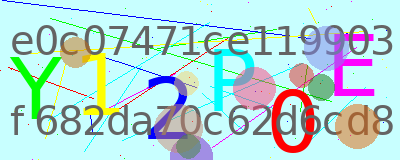
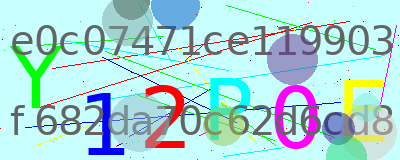
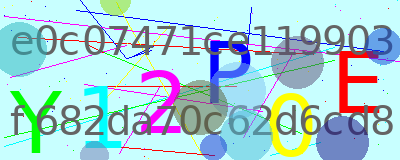
The Authentication Flow
My authentication logic follows these key steps:
Time is Basic Elements to ALL
Because of we need to sync the timer of linux server.. The system provided service is too active to try to connect unknow server, so, write a C prog to do it..
| |
You can use ‘-h/–help’ to print the help info.
Tag: Haproxy
Piece 2: Signup System(Login 3)
Piece 2: Signup System(Login 3)
Components
- HAProxy: Acts as the reverse proxy, listening on “/signup” and forwarding requests to the .c2 backend.
- .c2 Backend: A separate C-based backend (distinct from the .c login backend) handling signup logic.
- Redis: Stores signup tracking (select 5) and user data (select 0).
Target
- Allow users to self-sign up for an account with privacy as the highest priority, assigning them level 0 and a 30-day TTL, while preventing bot abuse and ensuring unique usernames.
Requirements (Your Inputs)
- Endpoint: HAProxy listens on “/signup”, accessible to anyone for self-signup.
- Backend: Requests are redirected to .c2 (you labeled it .c2 to distinguish it from the login .c backend).
- IP Limiting: Track
user/ipin Redis “select 5” with a TTL of 3600s. If an IP has successfully signed up within 3600s, redirect to an HTML page saying “Your IP has already registered. Multi-register is not allowed.” - Username Rules: Allow signup if the username:
- Starts with a-zA-Z.
- Contains only a-zA-Z0-9.
- Is more than 8 characters.
- Doesn’t already exist.
- Return a generic “signup failed” error for any failure (no specific reasons like “username exists”).
- New User Settings: Set TTL to 30 days and level to 0 (no extra privileges).
- Storage: Save new users to “select 0” (you confirmed this as the user database).
- Privacy: No email or phone verification—users re-sign up if they lose passwords.
- Atomicity: Lock username insertion to prevent simultaneous duplicates (you agreed it’s unlikely but worth doing).
- IP Blocking Logic: 1 signup per IP in 3600s isn’t strict—users should wait if they need another account.
- CAPTCHA: No Google CAPTCHA; add a self-hosted CAPTCHA replacement for bot protection (you requested this for signup, login, and admin).
- TTL Expiry: If a new user’s TTL (30 days) expires, delete the account completely, allowing username reuse.
- Username as Key: Use
usernameas the key in Redis (e.g., for GET/SET or HGET/HSET).
Conceptual Solutions (My Suggestions Integrated with Your Decisions)
Flow:
The Sneaky Slash
The Sneaky Slash
How a Double Forward Slash Bypassed My HAProxy Security Rules
Introduction
Yesterday, I discovered a concerning security hole in my HAProxy configuration that made me question how secure my admin area really was. I’m sharing this finding and solution to help others who might have the same vulnerability without realizing it.
The Discovery
I had set up HAProxy to protect my website’s admin panel using a seemingly solid approach:
C code for CAPTCHA (Login 3)
C code for CAPTCHA (Login 3)
Building a Self-Hosted CAPTCHA System with HAProxy
After preparing the HAProxy server and the authentication Lua verification script, I needed to develop a PNG generator and user authentication mechanism to complete my self-hosted CAPTCHA server. I decided to use C for the core functionality due to its performance and control over system resources..
The Authentication Flow
My authentication logic follows these key steps:
Evolving Web Authentication(login 1)
Evolving Web Authentication(login 1)
From Simple Cookies to Secure Sessions
In the early days of web applications, servers used a straightforward approach to identify returning users. When you logged in, the server would issue your browser a cookie - a small piece of data that identified you as an authenticated user.
During subsequent visits, your browser automatically submits this cookie with each request. The server would perform a simple check: “Does this request include a cookie named ‘your_name_session’?” If yes, access granted. This basic system worked well initially.
Finding a Login Protection Solution
Finding a Login Protection Solution
For any website, robust login protection is crucial. Existing solutions often fall short of my requirements:
- Security
- Dynamic capability
- Resistance to brute force attacks
I analyzed many options and initially considered Aerospike and ScyllaDB as ideal solutions. However, I abandoned these ideas because they proved too difficult to compile from source on standard Linux systems. I attempted builds on both Debian and Alpine with no success.
Tag: Html
Piece 2: Signup System(Login 3)
Piece 2: Signup System(Login 3)
Components
- HAProxy: Acts as the reverse proxy, listening on “/signup” and forwarding requests to the .c2 backend.
- .c2 Backend: A separate C-based backend (distinct from the .c login backend) handling signup logic.
- Redis: Stores signup tracking (select 5) and user data (select 0).
Target
- Allow users to self-sign up for an account with privacy as the highest priority, assigning them level 0 and a 30-day TTL, while preventing bot abuse and ensuring unique usernames.
Requirements (Your Inputs)
- Endpoint: HAProxy listens on “/signup”, accessible to anyone for self-signup.
- Backend: Requests are redirected to .c2 (you labeled it .c2 to distinguish it from the login .c backend).
- IP Limiting: Track
user/ipin Redis “select 5” with a TTL of 3600s. If an IP has successfully signed up within 3600s, redirect to an HTML page saying “Your IP has already registered. Multi-register is not allowed.” - Username Rules: Allow signup if the username:
- Starts with a-zA-Z.
- Contains only a-zA-Z0-9.
- Is more than 8 characters.
- Doesn’t already exist.
- Return a generic “signup failed” error for any failure (no specific reasons like “username exists”).
- New User Settings: Set TTL to 30 days and level to 0 (no extra privileges).
- Storage: Save new users to “select 0” (you confirmed this as the user database).
- Privacy: No email or phone verification—users re-sign up if they lose passwords.
- Atomicity: Lock username insertion to prevent simultaneous duplicates (you agreed it’s unlikely but worth doing).
- IP Blocking Logic: 1 signup per IP in 3600s isn’t strict—users should wait if they need another account.
- CAPTCHA: No Google CAPTCHA; add a self-hosted CAPTCHA replacement for bot protection (you requested this for signup, login, and admin).
- TTL Expiry: If a new user’s TTL (30 days) expires, delete the account completely, allowing username reuse.
- Username as Key: Use
usernameas the key in Redis (e.g., for GET/SET or HGET/HSET).
Conceptual Solutions (My Suggestions Integrated with Your Decisions)
Flow:
Tag: Login
Piece 2: Signup System(Login 3)
Piece 2: Signup System(Login 3)
Components
- HAProxy: Acts as the reverse proxy, listening on “/signup” and forwarding requests to the .c2 backend.
- .c2 Backend: A separate C-based backend (distinct from the .c login backend) handling signup logic.
- Redis: Stores signup tracking (select 5) and user data (select 0).
Target
- Allow users to self-sign up for an account with privacy as the highest priority, assigning them level 0 and a 30-day TTL, while preventing bot abuse and ensuring unique usernames.
Requirements (Your Inputs)
- Endpoint: HAProxy listens on “/signup”, accessible to anyone for self-signup.
- Backend: Requests are redirected to .c2 (you labeled it .c2 to distinguish it from the login .c backend).
- IP Limiting: Track
user/ipin Redis “select 5” with a TTL of 3600s. If an IP has successfully signed up within 3600s, redirect to an HTML page saying “Your IP has already registered. Multi-register is not allowed.” - Username Rules: Allow signup if the username:
- Starts with a-zA-Z.
- Contains only a-zA-Z0-9.
- Is more than 8 characters.
- Doesn’t already exist.
- Return a generic “signup failed” error for any failure (no specific reasons like “username exists”).
- New User Settings: Set TTL to 30 days and level to 0 (no extra privileges).
- Storage: Save new users to “select 0” (you confirmed this as the user database).
- Privacy: No email or phone verification—users re-sign up if they lose passwords.
- Atomicity: Lock username insertion to prevent simultaneous duplicates (you agreed it’s unlikely but worth doing).
- IP Blocking Logic: 1 signup per IP in 3600s isn’t strict—users should wait if they need another account.
- CAPTCHA: No Google CAPTCHA; add a self-hosted CAPTCHA replacement for bot protection (you requested this for signup, login, and admin).
- TTL Expiry: If a new user’s TTL (30 days) expires, delete the account completely, allowing username reuse.
- Username as Key: Use
usernameas the key in Redis (e.g., for GET/SET or HGET/HSET).
Conceptual Solutions (My Suggestions Integrated with Your Decisions)
Flow:
Tag: Redis
Piece 2: Signup System(Login 3)
Piece 2: Signup System(Login 3)
Components
- HAProxy: Acts as the reverse proxy, listening on “/signup” and forwarding requests to the .c2 backend.
- .c2 Backend: A separate C-based backend (distinct from the .c login backend) handling signup logic.
- Redis: Stores signup tracking (select 5) and user data (select 0).
Target
- Allow users to self-sign up for an account with privacy as the highest priority, assigning them level 0 and a 30-day TTL, while preventing bot abuse and ensuring unique usernames.
Requirements (Your Inputs)
- Endpoint: HAProxy listens on “/signup”, accessible to anyone for self-signup.
- Backend: Requests are redirected to .c2 (you labeled it .c2 to distinguish it from the login .c backend).
- IP Limiting: Track
user/ipin Redis “select 5” with a TTL of 3600s. If an IP has successfully signed up within 3600s, redirect to an HTML page saying “Your IP has already registered. Multi-register is not allowed.” - Username Rules: Allow signup if the username:
- Starts with a-zA-Z.
- Contains only a-zA-Z0-9.
- Is more than 8 characters.
- Doesn’t already exist.
- Return a generic “signup failed” error for any failure (no specific reasons like “username exists”).
- New User Settings: Set TTL to 30 days and level to 0 (no extra privileges).
- Storage: Save new users to “select 0” (you confirmed this as the user database).
- Privacy: No email or phone verification—users re-sign up if they lose passwords.
- Atomicity: Lock username insertion to prevent simultaneous duplicates (you agreed it’s unlikely but worth doing).
- IP Blocking Logic: 1 signup per IP in 3600s isn’t strict—users should wait if they need another account.
- CAPTCHA: No Google CAPTCHA; add a self-hosted CAPTCHA replacement for bot protection (you requested this for signup, login, and admin).
- TTL Expiry: If a new user’s TTL (30 days) expires, delete the account completely, allowing username reuse.
- Username as Key: Use
usernameas the key in Redis (e.g., for GET/SET or HGET/HSET).
Conceptual Solutions (My Suggestions Integrated with Your Decisions)
Flow:
Evolving Web Authentication(login 1)
Evolving Web Authentication(login 1)
From Simple Cookies to Secure Sessions
In the early days of web applications, servers used a straightforward approach to identify returning users. When you logged in, the server would issue your browser a cookie - a small piece of data that identified you as an authenticated user.
During subsequent visits, your browser automatically submits this cookie with each request. The server would perform a simple check: “Does this request include a cookie named ‘your_name_session’?” If yes, access granted. This basic system worked well initially.
Finding a Login Protection Solution
Finding a Login Protection Solution
For any website, robust login protection is crucial. Existing solutions often fall short of my requirements:
- Security
- Dynamic capability
- Resistance to brute force attacks
I analyzed many options and initially considered Aerospike and ScyllaDB as ideal solutions. However, I abandoned these ideas because they proved too difficult to compile from source on standard Linux systems. I attempted builds on both Debian and Alpine with no success.
Tag: Awk
The Sneaky Slash
The Sneaky Slash
How a Double Forward Slash Bypassed My HAProxy Security Rules
Introduction
Yesterday, I discovered a concerning security hole in my HAProxy configuration that made me question how secure my admin area really was. I’m sharing this finding and solution to help others who might have the same vulnerability without realizing it.
The Discovery
I had set up HAProxy to protect my website’s admin panel using a seemingly solid approach:
Tag: Grep
The Sneaky Slash
The Sneaky Slash
How a Double Forward Slash Bypassed My HAProxy Security Rules
Introduction
Yesterday, I discovered a concerning security hole in my HAProxy configuration that made me question how secure my admin area really was. I’m sharing this finding and solution to help others who might have the same vulnerability without realizing it.
The Discovery
I had set up HAProxy to protect my website’s admin panel using a seemingly solid approach:
Tag: Reg
The Sneaky Slash
The Sneaky Slash
How a Double Forward Slash Bypassed My HAProxy Security Rules
Introduction
Yesterday, I discovered a concerning security hole in my HAProxy configuration that made me question how secure my admin area really was. I’m sharing this finding and solution to help others who might have the same vulnerability without realizing it.
The Discovery
I had set up HAProxy to protect my website’s admin panel using a seemingly solid approach:
Tag: Sed
The Sneaky Slash
The Sneaky Slash
How a Double Forward Slash Bypassed My HAProxy Security Rules
Introduction
Yesterday, I discovered a concerning security hole in my HAProxy configuration that made me question how secure my admin area really was. I’m sharing this finding and solution to help others who might have the same vulnerability without realizing it.
The Discovery
I had set up HAProxy to protect my website’s admin panel using a seemingly solid approach:
Tag: CAPTCHA
C code for CAPTCHA (Login 3)
C code for CAPTCHA (Login 3)
Building a Self-Hosted CAPTCHA System with HAProxy
After preparing the HAProxy server and the authentication Lua verification script, I needed to develop a PNG generator and user authentication mechanism to complete my self-hosted CAPTCHA server. I decided to use C for the core functionality due to its performance and control over system resources..
The Authentication Flow
My authentication logic follows these key steps:
Tag: Chaptcha
Evolving Web Authentication(login 1)
Evolving Web Authentication(login 1)
From Simple Cookies to Secure Sessions
In the early days of web applications, servers used a straightforward approach to identify returning users. When you logged in, the server would issue your browser a cookie - a small piece of data that identified you as an authenticated user.
During subsequent visits, your browser automatically submits this cookie with each request. The server would perform a simple check: “Does this request include a cookie named ‘your_name_session’?” If yes, access granted. This basic system worked well initially.
Tag: Lua
Evolving Web Authentication(login 1)
Evolving Web Authentication(login 1)
From Simple Cookies to Secure Sessions
In the early days of web applications, servers used a straightforward approach to identify returning users. When you logged in, the server would issue your browser a cookie - a small piece of data that identified you as an authenticated user.
During subsequent visits, your browser automatically submits this cookie with each request. The server would perform a simple check: “Does this request include a cookie named ‘your_name_session’?” If yes, access granted. This basic system worked well initially.
Tag: CSP
Protecting Website with CSP
Protecting Website with CSP
CSP : Content Security Policy
When your website starts serving to the world, it becomes a potential target for hackers. You might want to allow URLs only from your website to prevent cross-site attacks.
Modern browsers allow websites to announce a header called “Content-Security-Policy” (CSP). You can specify which sites are allowed in this header, and browsers will block resources from any sites not in your CSP, treating them as cross-site attacks.
Tag: Server
Protecting Website with CSP
Protecting Website with CSP
CSP : Content Security Policy
When your website starts serving to the world, it becomes a potential target for hackers. You might want to allow URLs only from your website to prevent cross-site attacks.
Modern browsers allow websites to announce a header called “Content-Security-Policy” (CSP). You can specify which sites are allowed in this header, and browsers will block resources from any sites not in your CSP, treating them as cross-site attacks.
Finding a Login Protection Solution
Finding a Login Protection Solution
For any website, robust login protection is crucial. Existing solutions often fall short of my requirements:
- Security
- Dynamic capability
- Resistance to brute force attacks
I analyzed many options and initially considered Aerospike and ScyllaDB as ideal solutions. However, I abandoned these ideas because they proved too difficult to compile from source on standard Linux systems. I attempted builds on both Debian and Alpine with no success.
Time is Basic Elements to ALL
Because of we need to sync the timer of linux server.. The system provided service is too active to try to connect unknow server, so, write a C prog to do it..
| |
You can use ‘-h/–help’ to print the help info.
Tag: Website
Protecting Website with CSP
Protecting Website with CSP
CSP : Content Security Policy
When your website starts serving to the world, it becomes a potential target for hackers. You might want to allow URLs only from your website to prevent cross-site attacks.
Modern browsers allow websites to announce a header called “Content-Security-Policy” (CSP). You can specify which sites are allowed in this header, and browsers will block resources from any sites not in your CSP, treating them as cross-site attacks.
Tag: Time
Time is Basic Elements to ALL
Because of we need to sync the timer of linux server.. The system provided service is too active to try to connect unknow server, so, write a C prog to do it..
| |
You can use ‘-h/–help’ to print the help info.
Tag: NoneTags
God is the King of kings.
This is the first blog of WeTalk.
We are trying our best to serve our God by this website. . .